dbsetupmate
About


dbsetupmate is a Python package and CLI, which overtakes a role of a database mate. Primary purpose is to create and maintain database schemas and users.
Install
Installation using uv
uv pip install dbsetupmate
Copy sample.env to .env and adjust the POSTGRESQL_* values.
Using Python package as CLI
- Show the available commands and options
dbsetupmate --help - Create a database together with its owner and login user
dbsetupmate --env-file .env postgresql create-db --new-db-name course_db_01 --new-db-user course_user_01 - Next free generated database name
dbsetupmate --env-file .env postgresql show-next-db-name - Create the shared database
dbsetupmate --env-file .env postgresql create-shared-db - Read-only user for the shared database
dbsetupmate --env-file .env postgresql create-shared-user-readonly - Grant an existing user read-only access to the shared database
dbsetupmate --env-file .env postgresql grant-shared-access --user-name course_user_01 - Revoke that access again
dbsetupmate --env-file .env postgresql revoke-shared-access --user-name course_user_01 - List the databases, the users and the resolved settings
dbsetupmate --env-file .env postgresql show-dbs dbsetupmate --env-file .env postgresql show-users dbsetupmate --env-file .env postgresql show-config - Change a user password
dbsetupmate --env-file .env postgresql set-user-password --user-name course_user_01 - Drop a database together with its roles
dbsetupmate --env-file .env postgresql drop-db --db-name course_db_01 --db-user course_user_01 - Drop a user
dbsetupmate --env-file .env postgresql drop-user --user-name course_user_01 - There is also a
dry-runoption for all commandsdbsetupmate --env-file .env --dry-run postgresql create-db
P.S. The password is prompted for when --new-db-password or --password is omitted.
Commands exit 1 on failure. drop-db and drop-user ask for confirmation; pass --yes to skip it.
Example how to use it as a Python Package: basics
Here is a example how to use dbsetupmate as Python library.
from dbsetupmate import PostgresMate, PostgreSQLConfig, DBSetupMateException

mate = PostgresMate(PostgreSQLConfig(host="db.internal", admin_password="..."))

try:
    created = mate.create_db("course_db_01", "course_user_01", "s3cret")
except DBSetupMateException as ex:
    print(ex)
PostgreSQLConfig.from_env() reads the POSTGRESQL_* variables instead. Failures raise a
subclass of DBSetupMateException, never a bool.
Example how to use it as a Python Package: full workflow
A full workflow — create a user, ensure the shared database exists, and grant that user read-only access to it:
from dbsetupmate import PostgresMate, PostgreSQLConfig, DBSetupMateException
from dotenv import load_dotenv

load_dotenv()
mate = PostgresMate(PostgreSQLConfig.from_env())
config = mate.config
all_created = False

try:
    # 1. Create a user together with its own database.
    mate.create_db("course_db_01", "course_user_01", "s3cret")

    # 2. + 3. Create the shared database only if it is not there yet.
    if not mate.database_exists(config.shared_db):
        mate.create_shared_db()

    # 4. Give the new user read-only access to the shared database.
    result = mate.grant_shared_access("course_user_01")
    all_created = True
except DBSetupMateException as ex:
    print(ex)
    all_created = False
print(f'All created: {all_created}')
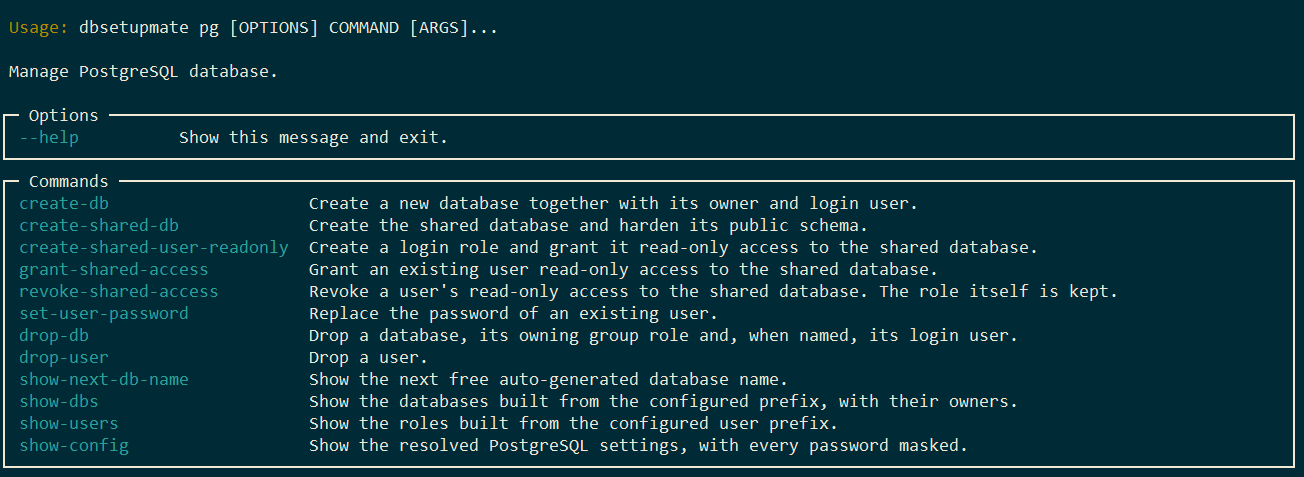
CLI UI
CLI features overview of the postgresql category:
dbsetupmate pg --help
Development: Setup
This guide walks through setting up the project for local development using uv.
- Create a new virtual environment in a
.venvdirectory and activates it.uv venv - Activate the environment (macOS/Linux):
source .venv/bin/activate - Activate the environment (Windows):
call .venv/Scripts/activate.bat - Install package in editable mode with dev dependencies
Installing the package in editable mode (
-e) is the key to development.uv pip install -e . --group dev
Development: Running Tests
task py:pytest              # unit tests, no database needed
task py:pytest-integration  # against live PostgreSQL 15..18 (see compose-tests.yaml)